Why Does OpenClaw Consume Tokens So Fast?
The first part of this article answers a fundamental yet critical question:
What Does OpenClaw Actually Send to the Model Per Interaction?
When we say “the context is large and tokens are consumed quickly,” we essentially mean that every time OpenClaw calls the model API, it sends a “complete input” to the model — one that far exceeds the user’s single message.
Here is a breakdown of what this input consists of and where it comes from.
1. System Prompt
The system prompt is the “instruction manual” that OpenClaw includes with every model call. It contains multiple fixed or semi-fixed sections, with the core purpose of telling the model what it is, what tools it has, which working directory it’s in, how to handle memory and channel messages, and so on.
The system prompt is a “big box” that includes the following sub-blocks:
- Tooling section: lists available tools and brief descriptions.
- Safety section: basic safety and behavioral constraints.
- Skills section: skill directory prompt (can be very long, growing with the number of skills).
- Memory section: memory retrieval specification (tells the model to search MEMORY.md first, etc.).
- Documentation section: local documentation path hints.
- Workspace section: current working directory + notes.
- Project Context section: injected context file content (usually the largest portion).
- Messaging/Voice/Reply Tags/Sandbox/Runtime and other auxiliary sections.
The reason sections 2–4 below are covered separately is to highlight their “contribution” to token volume — they are not independent parts outside the system prompt.
The system prompt construction logic is concentrated in:
src/agents/pi-embedded-runner/run/attempt.tssrc/agents/pi-embedded-runner/system-prompt.tssrc/agents/system-prompt.ts
2. Project Context Injection
This is one of the most significant contributors to token consumption. Before each run, OpenClaw reads a set of workspace “bootstrap files” and injects their full content into the system prompt.
The files read by default include:
AGENTS.mdSOUL.mdTOOLS.mdIDENTITY.mdUSER.mdHEARTBEAT.mdBOOTSTRAP.mdMEMORY.mdormemory.md
Each file is trimmed (default single-file limit: 20,000 chars), then inserted in the following format:
# Project Context
## BOOTSTRAP.md
<content>
The logic resides in:
src/agents/workspace.ts(reads file collection)src/agents/bootstrap-files.ts(assembles injection)src/agents/pi-embedded-helpers/bootstrap.ts(trimming)src/agents/system-prompt.ts(final injection)
3. Skills List
If skills are enabled, OpenClaw compiles all skills into a directory section and injects it into the system prompt. This list grows linearly with the number of skills and the length of their descriptions.
These are not “tools” but rather “workflow instructions” — the model reads SKILL.md based on the prompt.
Related logic:
src/agents/skills/workspace.tssrc/agents/system-prompt.ts
4. Tool Definitions (Tool List + Schema)
The list of tools the model can actually call (e.g., read, exec, message) is injected into the system prompt. Tool parameter schemas are also passed to the model. This part is usually not fully displayed in the prompt, but it still consumes input tokens.
Related logic:
src/agents/pi-tools.tssrc/agents/system-prompt.ts
5. Conversation History + Tool Results
In addition to the system prompt, OpenClaw also sends the session’s historical messages and tool call results to the model. This history accumulates continuously until compaction or memory flush is triggered.
Related logic:
src/agents/pi-embedded-runner/run/attempt.ts(loads history)src/agents/pi-embedded-runner/compact.ts(compaction)
6. Current User Input
Finally, the user’s current message — combined with everything above, it forms the “complete input for this API call.”
Summary: A single interaction is far more than “just sending your one message.”
Each time OpenClaw calls the model, it sends:
- System prompt (very long)
- Project context (very long)
- Skills list (can be very long)
- Tool schemas (can be very long)
- Conversation history and tool results (keeps growing)
- Current user message
This is why tokens grow so fast.
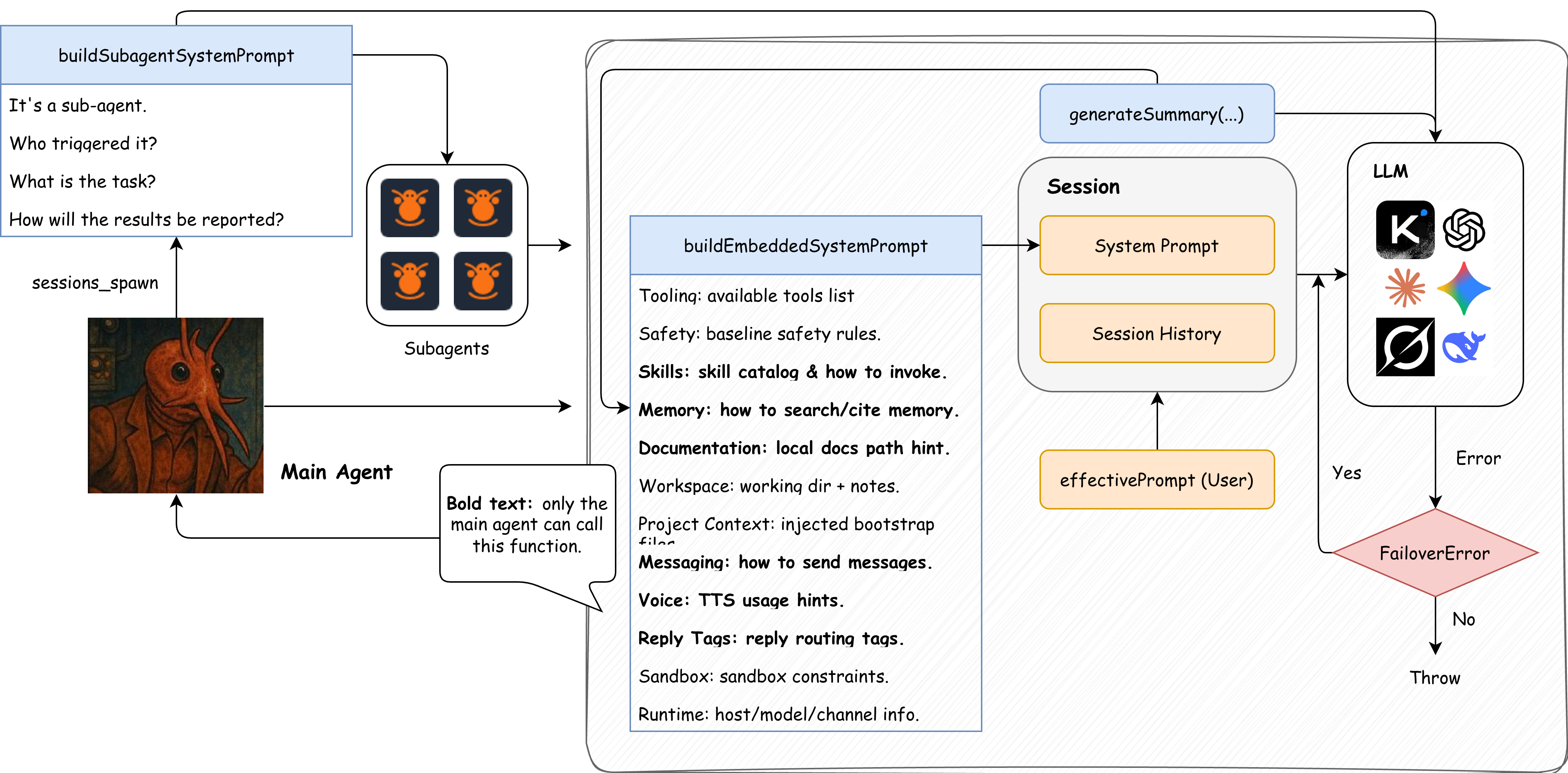
Figure: The relationship between system prompt, session history, user input, and sub-agent/fallback/compaction in a single request.
Code Evidence: The “Final Assembly Point” of the System Prompt
Below is a key snippet from src/agents/pi-embedded-runner/run/attempt.ts, which clearly shows what gets packaged into the system prompt (simplified):
// src/agents/pi-embedded-runner/run/attempt.ts
const appendPrompt = buildEmbeddedSystemPrompt({
  skillsPrompt,        // Skills list
  contextFiles,        // Project Context (BOOTSTRAP, etc.)
  tools,               // Tool list + schema
  docsPath,            // Documentation hints
  runtimeInfo,         // Runtime environment info
  workspaceNotes,      // Workspace hints
  sandboxInfo,         // Sandbox info
  modelAliasLines,     // Model aliases
  // ... and more auxiliary info
});
A Single Request May Trigger Multiple API Calls: Tool Call Chains
A single “user request” doesn’t necessarily result in just one model API call. The most common reason is tool call chains:
- After seeing the tool list, the model initiates a tool call (e.g.,
read/exec). - OpenClaw executes the tool and produces a tool result.
- The tool result is written back to the session (as a tool message).
- The model continues generating, initiating the next tool call if necessary.
This means a single user input may produce multiple rounds of model interaction, thereby consuming tokens faster.
Corresponding code entry points (simplified paths):
- Tool definitions:
src/agents/pi-tools.ts - Session creation + tools injection:
src/agents/pi-embedded-runner/run/attempt.ts - Subscribing to tool events:
src/agents/pi-embedded-subscribe.ts - Tool execution lifecycle handling:
src/agents/pi-embedded-subscribe.handlers.tools.ts
Failure Retry / Fallback: How Model Fallback and Retry Work
OpenClaw doesn’t just give up when something goes wrong. When a model call fails (timeout, rate limiting, authentication errors, etc.), the system attempts model fallback, continuing with the next model in the candidate list.
The core logic is implemented in runWithModelFallback:src/agents/model-fallback.ts
The logic is very straightforward:
- Generate a “candidate model list” based on configuration (from
agents.defaults.model.fallbacksor overrides passed at call time). - Try calling models one by one in order.
- Only proceed to the next fallback if the error is classified as a FailoverError; otherwise, throw the error directly.
This means a single user request may trigger multiple API calls due to the fallback mechanism. Of course, this is a good thing.
Compaction and Memory Flush: What Happens When Context Is Nearly Full
When the context is nearly full, OpenClaw may trigger two different types of additional model calls:
One is Compaction (summary compression), and the other is Memory Flush (memory write-out). They serve different purposes and follow different processes.
1. Compaction (Summary Compression)
Goal: Compress the conversation history into “shorter summaries” to free up context space.
Implementation logic: src/agents/compaction.ts
Key points:
Does not send the entire history to the model at once
Instead, it splits the history into chunks by token count, calls the model to generate a summary for each chunk, then merges them into one final summary.If a single message is too large
It falls back to summarizing only the small messages, using placeholder hints for large ones.
Simplified flow:
History messages → Split by token count → Model summarizes each chunk → Merge summaries
2. Memory Flush (Memory Write-Out)
Goal: Before compaction, write “long-term memories” to disk (memory/YYYY-MM-DD.md).
Trigger logic: src/auto-reply/reply/agent-runner-memory.ts
Prompts and default text: src/auto-reply/reply/memory-flush.ts
Key points:
Not summarizing history
Rather, it asks the model to organize “memories worth long-term preservation” and writes them to thememory/directory.This is an additional round of model calls
Its purpose is to preserve persistent memories, not to compress context.
Sub-Agent / sessions_spawn: How Parallelism and Task Division Cause Additional Calls
When a task is complex, time-consuming, or suitable for parallelism, the main agent may call the sessions_spawn tool to delegate subtasks to sub-agents. This starts a completely new sub-session with its own sessionKey, system prompt, and tool pipeline, resulting in additional model calls.
Core entry point: src/agents/tools/sessions-spawn-tool.ts
Simplified flow:
- The main agent calls
sessions_spawn(this is a tool call choice made by the model). - The system generates a
childSessionKey(agent:<id>:subagent:<uuid>). - Constructs the sub-agent’s system prompt (
buildSubagentSystemPrompt). - Launches the sub-agent’s independent run flow via
callGateway. - After the sub-agent completes its task, the result is passed back to the main session.
In short, a sub-agent is “starting an entirely new complete session.” Therefore, it significantly increases the total number of API calls and token consumption.